
Sample result detail
See how the final evidence view is structured
This is the profile detail view a buyer opens after unlocking results, shown on three real capture packages from Hinge, Bumble, and Tinder with names and faces blurred: the branded profile header, the stamped screenshot stack, the harvested profile details, sharing, the reviewer reading, and next steps.
Real capture output with names and faces blurred. The reviewer reading below is illustrative; the rest is the view a buyer gets, rendered with the same components.
BumbleSample · names and faces blurred
Medium confidence
Name blurred, 33
Brooklyn, 2 miles away
- Recently active
- Captured on device
- 4 screenshots
- Height
- 5'8" (173 cm)
- Distance
- 2 mi away
- Looking for
- Something casual
Screenshots
4 frames, stamped to the order
Full-screen Bumble frames, scrolled top to bottom exactly as the profile shows them.
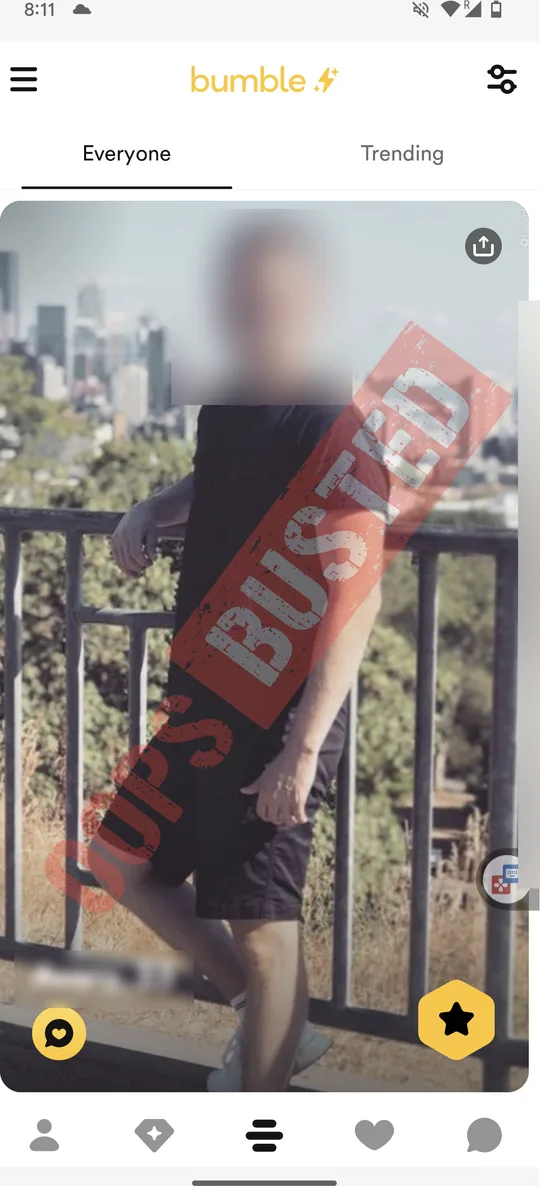
Download 4 stamped screenshots
In your report every frame is burned with your order stamp, so a copy that leaves your hands still traces back to the order.
Download PDF report
The compiled report for the whole order, watermarked, listing every profile with its harvested details.
Profile information
What the Bumble profile says
Read from the screenshots and checked by a reviewer before delivery. Shown the way the app shows it.
My basics
- ActivityRecently active
- GenderMan
- Height5'8" (173 cm)
- LocationBrooklyn
- Distance2 mi away
- ZodiacPisces
- DrinkingSocially
- Something casual
Share
Keep it private, share only what you choose
OopsBusted review: Bumble profile "Name blurred, 33" · Brooklyn, 2 miles away · 4 screenshots · medium confidence. Reviewed before delivery; not a confirmed identity and not proof of intent. Order ref ••••••••.
- Share or copy the written summary. Screenshots never leave through this panel.
- Email yourself a fresh secure link to the full report at any time.
- OopsBusted does not send a search alert to the person you search. This does not guarantee secrecy: shared devices, accounts, receipts, or saved reports can reveal your activity, and third-party services have their own notification behavior.
Reviewer reading
How strong is this match?
Illustrative for this sample. On a paid order the reading is generated from the actual order and evidence.
Promising, but still incomplete.
Four frames and a short basics row give a plausible lead, but there is no bio, no prompt, and the distance is the only geography cue. Read it against what you already know before treating it as proof.
Why this matched
- Height, age, and the Brooklyn distance all fit the intake notes.
- The main photo and the profile-view photo look like the same person.
Why this may be wrong
- No bio or prompts, so there is nothing written to compare against.
- A 2-mile radius in Brooklyn covers hundreds of thousands of people.
- One of the four photos is a side profile, which weakens face comparison.
Recommended next action
Upload a clearer photo before trusting a thin lead
A clearer reference photo, or a second app, would turn a plausible lead into something you can act on with confidence.
Factor review
- Supported
Photo reference
The reference photo resembles the profile photos, but two of the four are side or distance shots.
- Strong
Platform fit
The profile surfaced on the app the buyer expected, inside the paid scope.
- Supported
Location overlap
"Brooklyn, 2 miles away" fits the intake area but is a coarse signal on its own.
- Thin
Screenshot depth
Four frames were captured; the profile has no bio or prompt section to scroll.
- Supported
Recentness
The profile showed an "Active" badge at capture time.
Go further
Next steps from here
Also available on this order
Also check
3 profiles found on Tinder
Your search already ran on Tinder. Unlock it to review every frame and detail for these profiles on this order.
$4.99Unlock TinderAlso check
4 profiles found on Hinge
Your search already ran on Hinge. Unlock it to review every frame and detail for these profiles on this order.
$4.99Unlock HingeYour side
Check your own exposure
See whether your own photos surface on the apps, and what a stranger could learn about you from them.
How the detail view is put together
Six parts, in the order you read them.
- 1
Profile header
The strongest identifying cues first, in the app's own colours: avatar, age, location, activity, verified badge, capture date, frame count, and the confidence label.
- 2
Screenshot stack
Every full-screen frame in capture order, each burned with the order stamp, so the reader compares the whole sequence instead of one image.
- 3
Profile information
Height, distance, school, work, religion, politics, languages, intent, lifestyle chips, bio, and prompts, laid out the way the source app shows them.
- 4
Share and download
A written summary for the share sheet, a secure-link email, and stamped downloads. Written summaries omit screenshots; shared files and forwarded emails can reveal report details to their recipients.
- 5
Reviewer reading
Why the match holds, why it may be wrong, a recommended next action, and five factors rated from strong to missing, so a strong-looking result still gets restraint.
- 6
Review-before-use boundary
Customer-facing evidence should be included only after OopsBusted review confirms the packet is usable, visible, and not pending or rejected contributor material.
About this sample
The point of this page is to show the structure of the unlocked detail view before you commit to checkout, using genuine capture output rather than a staged mock.
- The frames are genuine capture output. Names and faces are blurred for this page; buyers receive the unblurred frames with their order stamp.
- The reviewer reading here is illustrative. On a paid order it is generated from the actual order and evidence, and our manual check stays visible-evidence only.
- Fresh manual checks and contributor-assisted evidence are included only after OopsBusted review approval.
- Downloads, sharing, and the secure-link email work only inside a paid report, which is why they are described rather than wired on this page.